Internal Hardware:
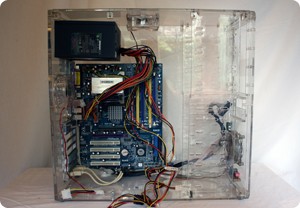
- Central Processing Unit (CPU): This is found inside the computer case on the motherboard. This is the computer's brain. It's job is to process the commands for the computer. Whenever the user does something such as press a key, click the mouse or start a programme, you send messages to the CPU which it then carries out. The processor can get very hot and so there is a heat sink and fan positioned above it on the motherboard to keep it from overheating. All CPUs have a speed. The faster a CPU speed rating the faster it can execute instructions. It is usually measured in megahertz, which is millions of instructions per second. However, the speed your computer runs at is not solely dependent on CPU speed, the speed of the other internal components of your computer matter too.
- Motherboard: This is the computer's main circuit board and is where the CPU sits. It also has slots or connectors for the other internal parts of the computer – memory, hard-drive, expansion cars and ports. It connects either directly or indirectly to every part of the computer. In other words, it is like a mother to all the other circuitry – hence the name.
- Power supply unit: This converts the power from the mains outlet to the type of power needed to run the computer. It also powers the fans in the case to keep everything cool and prevent anything overheating.
- Random Access Memory (RAM): This is the computer's short-term memory. As you use your computer it performs calculations or carries out commands and needs to temporarily store the data until it might be needed. When you switch off the computer this memory is lost. If you are working on a document or game you need to save it if you want to keep it. This data is written to your hard drive which is long term storage and not lost when the machine powers off. The more RAM you have the more things the computer can do at once. For example, if your computer slows down when you have lots of applications open at once (internet, word document, powerpoint document, a video playing and a game open) then you could be using up all your RAM. Many people expand the amount of RAM in their computer to take account of this. RAM is usually measured in megabytes.
- Hard Drive: This is the data centre of a computer and where all the software is installed. It is also where you store documents and files. It is long-term storage so it's data is not lost when the machine is unplugged or switched off. To run a programme the computer copies some data from the hard drive into RAM to access the data more easily. When you save, the data is copied back to the hard drive. The faster your drive, the faster the computer will load and start programmes. You can have more than one hard drive connected to a computer. Most hard drives store data on magnetic plates but some now use solid-state drives. These are faster and more durable than traditional magnetic plate drives but also more expensive. USB flash drives are basically small removable drives that can plug into USB ports. These make it handy to transfer and carry files and documents about.
- Optical Disc Drive: This is the DVD-CD drive. It is an input-output device as it reads the data on CD and DVD discs for the computer or write data to the disc. Older computers may also have floppy drives for reading magnetic discs but these are less common as the amount of data on a floppy disc is small compared to the amount of storage available on CDs, DVDs or memory sticks.
- Expansion Cards: On the motherboard there are usually a number of expansion slots allowing you to add various types of expansion card. These are often called Peripheral Component Interconnect (PCI) Cards. As most motherboards have built in video, sound, network and other capabilities you may never need to use them however, many people want to boost the performance or their computer or update the capabilities of older computers and choose to add them. Here are some examples:
- Video Card: This is what allows you to see things on the monitor. Most computers have a graphics processing unit built in on the motherboard but if you like using graphics-intense applications (such as gaming) you can add a faster video card to enhance performance.
- Sound Card: This is how you hear through the speakers speakers or earphones.
- Network Card: This allows the computer to communicate over a network and access the internet. You can get Ethernet or wireless network cards.

